
InfoBatch®
Automatically generate release-ready batch records from automation, historian, LIMS, and MES data you already have. Simplify compliance documentation, production reporting, and process analytics in regulated environments.
-

Records are generated automatically or on-demand, ensuring that critical information is available throughout batch execution.
-

Your infrastructure stays in place, your team owns the record configuration, and one reporting standard scales from a single manufacturing area to a global network.
-

The solution enforces data integrity to ensure compliance with 21 CFR Part 11 and EU Annex 11.
-

Electronic signatures, role-based access, and a complete audit trail provide the traceability required in a regulated environment.
-

The InfoBatch Library Manager creates reusable report configurations, streamlining standardization across areas, sites, and enterprises.








Built for Regulated Manufacturing at Scale

Data is queried from your automation systems, historian, MES, and LIMS at report generation time. No redundant data storage that requires validation and maintenance.

Your engineers build and update records in a point-and-click configurator, without a developer queue or a vendor change order.

Leading Life Science manufacturers turn to InfoBatch to replace unmanageable systems that become costly, complex, and unreliable.
The Batch Record Problems Every Regulated Manufacturer Faces
Production Data Lives in Systems Built to Control, Not to Report
Your automation systems run the process. Your historians store the data. Your LIMS holds in-process and release testing. Your MES tracks execution, and your ERP carries material genealogy.
Each system does its job well, but none of them was designed to produce a compliant batch record that spans all of these systems.
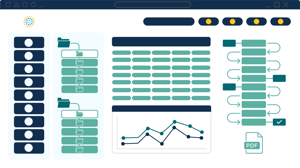
Quality Teams Assemble Records Using Disparate Systems
A single batch can consume hours of skilled quality analyst time before formal review even begins. Every manual activity is an opportunity for error.
Custom Reporting Is Expensive to Build and Harder to Keep
Reporting tools bundled with proprietary manufacturing systems tie you to one vendor and one data model. Custom-coded solutions introduce another set of problems with added maintenance risk.
Regulatory Requirements Are Difficult to Meet with General-Purpose Tools
21 CFR Part 11 and EU Annex 11 require authentication, controlled access, electronic signature binding, and a secure, computer-generated, time-stamped audit trail. Agency investigators increasingly ask where a value came from, who changed it, and whether the change was approved. Records assembled in general-purpose software cannot answer those questions.
Every Recipe Change Restarts the Development and Validation Cycle
Paper Review Workflows Delay Release
How InfoBatch Builds the Record
Native Connectivity Across the Automation Stack
InfoBatch connects to DeltaV and Syncade, Rockwell FactoryTalk, historians, MES, LIMS, and ERP through preconfigured connectors. Connection is a configuration exercise, not an integration project, and no middleware layer sits between InfoBatch and your systems of record.
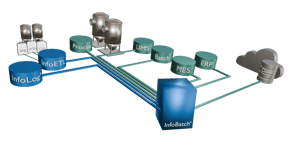
Data Is Read From the Source at Generation Time
When a record is generated, InfoBatch queries each source system directly and pulls the appropriate historical values. Nothing is staged in an intermediate database, so there is no synchronization schedule to monitor, no disparity between the copy and the original, and no second data store to qualify. The record reflects what the source systems contain at the moment the batch was produced.
Manufacturing Context Is Applied Automatically
Raw tags and timestamps do not constitute a batch record. InfoBatch data models apply plant hierarchy, equipment, phase, unit procedure, and batch context to every data point as it is retrieved. Values arrive in the record already associated with the step that produced them.
Code-Free Configuration Mirrored to Your Plant Hierarchy
Record configuration happens in a structured point-and-click interface organized the way your process is structured. Quality and engineering staff who understand the process build the record. Configuration is version-controlled and change-managed inside the application rather than in files on a network drive.
A Reusable Library Instead of Duplicated Templates
AutoGen™ Generates Records on Batch Completion
Exception Reporting Focuses Review on What Matters
Audit-Ready Review, Approval, Archive, and Version Control
Batch, Semi-Continuous, and Continuous Manufacturing
Batch Record Generation and Compliance Management
Data Connectivity and Aggregation
InfoBatch reads from the systems already running your process. Nothing is copied into an intermediate store first.
- Preconfigured connectors for industry-leading platforms such as DeltaV and Syncade, Rockwell FactoryTalk, AVEVA PI, AspenTech InfoPlus.21, and more
- OPC, ODBC, and OLEDB-compatible data sources
- LIMS, MES, and ERP connectivity for in-process results, execution data, and material genealogy
- File-based instrument, skid, and HMI data through InfoETL™, covering CSV, XML, SQLite, and JSON with no scripting
- Data retrieved from each source at generation time, with no replication layer, no middleware, and no synchronization schedule to monitor
-
Genealogy licensing connects multiple manufacturing areas to a single InfoBatch server

Record Configuration and Reuse
Configuration is owned by the people who understand the process, not by a development queue.
- Point-and-click configurator organized to mirror your plant hierarchy
- Record configuration performed without code and without vendor change orders
- Library Manager stores reusable record sections as shared components
- A change to a shared element propagates to every record that uses it
- Version-controlled, auditable configuration managed inside the application rather than in files on disks
- Backward compatibility maintained across releases, so upgrades do not break existing configurations
Automated Generation and Exception-Based Review
Records are produced on the event, and reviewers see what needs attention rather than everything.
- InfoBatch AutoGen™ triggers finished records on batch completion events and pushes them to review queues
- Scheduled and on-demand generation for periodic assessment, certificates of analysis, and cycle time reporting
- Automatic limit monitoring surfaces exceptions and quality deviations
- Exception-based review focuses attention on out-of-limit results instead of full-record reading
- Multi-thousand-page records with rich embedded content, generated in minutes
- Report generation improvements of 50% to 90% against prior alternative approaches
Compliance and Data Integrity
Records are built to hold up under inspection, and so is the process that produced them.
- 21 CFR Part 11 and EU Annex 11 compliant electronic signatures bound to their records
- Secure, computer-generated, time-stamped audit trail across generation, review, approval, and archive
- Unique user authentication and role-based access control at every stage
- Full configuration version control, with prior versions retrievable for the retention period your regulators require
- Data provenance traceable to the source system, parameter, and retrieval timestamp for every value in the record
- Electronic review and approval routing that replaces the paper trail
Validation, Architecture, and Deployment
Purpose-built for GMP, with a validated footprint smaller than the tools it replaces.
- Purpose-built GMP product with IQ/OQ/PQ documentation support
- Validation cost and effort reduced by up to 75% compared with proprietary tools.
-
No redundant database in the reporting path, which simplifies validation and maintenance scope
-
Configuration managed under change control
-
Server-based deployment on dedicated or virtual servers, sized for high-volume enterprise use
-
Modern browser-based web client
-
Web API for programmatic access and third-party integration
- Scales from a single manufacturing area to a multi-site network on one reporting standard
-
20+ years in production at compliance-critical sites, with continuous improvement and no product end-of-life

.png?width=105&height=130&name=pharma-equipment%20(9).png)
.png?width=105&height=130&name=pharma-equipment%20(12).png)
Built for Regulated Manufacturing at Scale
Designed for GMP manufacturers running complex, multi-system OT environments.
Large commercial pharmaceutical operations run automation, MES, historian, LIMS, and ERP systems that were selected at different times for different reasons. Batch documentation has to span all of them, satisfy 21 CFR Part 11 and EU GMP Annex 11, and hold up under inspection. InfoBatch is built for that environment: high record volumes, multi-thousand-page records, multiple sites, and quality organizations that need one trusted system.
.png?width=780&height=500&name=digital-transformation%20(1).png)