InfoBatch® ETL
-
Original equipment files encrypted and retained for audit back-verification. Directly addresses most common FDA data integrity findings. Compliance confidence.
-

Captures file-based equipment data from HMIs, instruments, and skids. General-purpose ETL and cloud platforms cannot. Solves what competitors don't address.
-

No custom scripts. Purpose-built for manufacturing compliance. Validation scope 40-60% smaller than scripted solutions. Faster deployment, lower cost.
-
Edge deployment without cloud dependency. Operates within facility boundaries. Meets OT/IT segmentation and security requirements.
-

Validated Transformers for common equipment (Rockwell, DeltaV, tablet presses). Reduces custom development. Implementation in weeks.








Data Silos End Here.
Automatically extract files from instruments, HMIs, and skids the moment they're generated. No manual collection. No USB drives. No gaps in your electronic batch records.

Original source files encrypted and retained alongside processed data. Complete audit trails on every data movement. Defensible process that holds up during FDA inspections.

Service-based architecture eliminates the custom scripts that break, require maintenance, and create validation risk. Configure the system. Let it work. No code to defend.
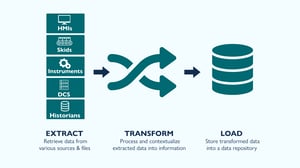
Extract: Capture Equipment Data
Automatic File Capture
Every day, your instruments, HMIs, and equipment skids generate files with operational intelligence. InfoBatch ETL captures them automatically the moment they're created, ensuring no data is lost, misplaced, or handled manually.
- Automatic file detection from CSV, XML, JSON, and SQLite sources across your facility
- Zero manual intervention: no USB drives, no scheduled exports, no human touchpoints in the data chain
- Service-based extraction: no custom scripts required, no integration code to maintain
- Immediate capture at the point of generation, ensuring no data is ever stranded or lost
Equipment Connectivity
InfoBatch ETL connects to the devices and systems that actually exist in your manufacturing facility without requiring system upgrades or equipment replacement.
- Rockwell FactoryTalk HMIs: audit trails, alarm logs, and process parameter files captured directly
- DeltaV and other DCS systems: batch data and historical records integrated without OPC/real-time connections required
- Laboratory instruments: HPLC, GC, dissolution, and analytical equipment output integrated into batch records
- Equipment skids: tablet presses, capsule fillers, blending equipment with embedded file logging
- Legacy equipment: older equipment lacking modern connectivity is supported because InfoBatch ETL captures files, not protocols
- Data historians: Spectral PAT and other continuous measurement systems integrated without custom development
Service-Based Architecture
Unlike scripted integration approaches, InfoBatch ETL eliminates custom code entirely, reducing implementation time and validation burden.
- Configuration-based approach: your team configures connections, the system captures files
- Pre-built device connectors: no custom development required for common pharmaceutical equipment
- Modular expansion: adding new equipment types requires only new connector modules, not system redesign
- Rapid deployment: typical initial connections established within days, not weeks
Audit Trail & Traceability
Every file captured is documented and traceable, creating a defensible record from the moment data enters the system.
- Complete logging: every file capture recorded with timestamp, source, and equipment identification
- Chain of custody: data provenance tracked from equipment through repository
- Tamper-evident records: audit trail cannot be altered without detection
- Inspection-ready documentation: audit trail reports generated on demand for regulatory review
Data Integrity During Extraction
Data integrity begins at capture, not later in processing, preventing corrupted data from entering your system.
- File validation: extracted files verified for completeness and structure integrity
- Source verification: files confirmed to originate from authenticated equipment
- Checksum tracking: file integrity verified throughout extraction and transfer
- Failure notification: extraction failures logged and flagged for immediate investigation
Scalability Across Your Facility
Start with one device and expand without re-architecture or system redesign.
- Modular design: each new equipment connection is an independent module
- Consistent framework: all extractions use the same validated approach regardless of source
- Multi-site capability: facility-wide deployment with potential for cross-site data synchronization
- Growth without complexity: adding the tenth device is as straightforward as the first
Turn Raw Data Into Intelligence
Data Validation & Quality Gates
Raw equipment files contain numbers without meaning, and data flows through multiple validation and processing layers to become manufacturing intelligence. InfoBatch ETL applies your rules, validates quality, converts units, and verifies integrity: sometimes re-processing data that doesn't meet standards before it reaches your batch record.
- Missing data detection: identifies gaps before they reach your batch record
- Range validation: flags out-of-specification values immediately
- Format verification: ensures data structure matches your requirements
- Suspicious pattern identification: detects anomalies like constant values or impossible relationships
- Quality gatekeeping: data that fails validation is isolated, logged, and flagged for investigation rather than silently passing through

Contextualization & Meaningful Information
- Unit conversion (Celsius to Fahrenheit, PSI to bar, etc.)
- Formula application (calculated fields, derived parameters)
- Time alignment and timestamp normalization
- Batch association: data matched to correct batch, work order, or campaign
- Equipment identification: clear traceability to which instrument/skid generated the data
- Process context: raw readings become meaningful batch parameters
Data Integrity Preservation
- Lineage tracking: complete record of how each data element was processed
- Immutable transformation log: every conversion step is documented
- Original data relationship: processed data always links back to source file
- Audit trail recording: who, what, when for every transformation rule applied
- Re-processing capability: data flagged for quality issues can be re-validated or re-processed without losing audit trail
Enterprise Readiness
- Structured format suited for downstream systems
- Compliance-ready validation that satisfies GMP requirements
- Complete metadata preserved alongside values
- Data ready for reporting, trend analysis, and decision-making
Load: Data Goes Everywhere It's Needed
Local Repository Architecture
Clean, contextualized data flows into your infrastructure where it belongs. Your batch records are complete. Your enterprise systems have the intelligence they need. Your teams have access to the information that drives decisions.
- Encrypted storage of all processed data within your facility
- Original source file retention: unmodified equipment files preserved alongside processed data for audit back-verification
- Auto-archiving: data retention policies enforced automatically without manual intervention
- SQL-queryable database: your data is accessible to standard reporting tools, not locked in proprietary formats

Enterprise System Integration
Data flows seamlessly into the systems your teams already use, eliminating manual export and re-entry.
- MES / Manufacturing Execution Systems: batch data flows to production tracking and work order systems
- LIMS / Laboratory Information Systems: analytical results populate automatically without transcription errors
- ERP / Enterprise Resource Planning: equipment utilization, batch yield, and cycle time data reaches business systems
- Batch Record Systems / Electronic Batch Records: equipment data, analytical results, and process parameters populate automatically
- Custom integrations: API-based architecture supports connection to any downstream system
- Data buffering: processed data queued for upload to multiple systems without latency
What Your Teams Can Now Do
- Quality teams have complete batch records during review and disposition
- Operations teams access real-time equipment performance and process parameters
- Engineering teams query historical data for trend analysis and root cause investigation
- Compliance teams generate audit trail reports showing complete data lineage
- Business leadership sees accurate equipment utilization and manufacturing efficiency metrics
- Manufacturing teams make decisions based on complete, current information instead of incomplete files
Data Accessibility & Querying
Your data is not locked away in proprietary formats. Standard tools can access it for reporting and analysis.
- SQL-queryable repository: standard database query tools work directly against the repository
- Real-time reporting: dashboards and reports reflect current data without export delays
- Custom queries: your teams can write their own queries for specific analysis needs
- Third-party tool integration: Tableau, Power BI, and other analytics platforms connect directly
- Historical analysis: years of archived data remain accessible for trend analysis and investigation
- No data export required: information flows directly from repository to analysis tools
Compliance & Security in Repository
Data stored in the repository meets GMP and regulatory requirements without supplemental security measures.
- Encryption at rest: all data encrypted using industry-standard cryptography
- Access controls: role-based permissions restrict who can view or modify data
- Audit logging: all repository access logged for compliance verification
- Data integrity checks: regular validation scans verify data has not been corrupted
- Backup and disaster recovery: automated protection against equipment failure and data loss
- Retention policy automation: archiving and destruction follows your compliance requirements automatically
Integration with Your Validation Framework
The repository architecture supports your existing validation and compliance processes.
- Validated architecture: pre-validated design reduces your IQ/OQ/PQ scope
- Configuration documentation: all repository settings documented and traceable
- Change control: modifications logged and auditable
- Compliance readiness: structure supports 21 CFR Part 11, ALCOA, and GMP requirements
- Inspection defensibility: repository design and operation documentable for regulatory review

.png?width=105&height=130&name=digital-transformation%20(8).png)
.png?width=105&height=130&name=digital-transformation%20(7).png)
Built for Regulated Manufacturing Operations
Designed for large, complex pharmaceutical facilities where data integrity is a compliance requirement and operational asset.
Every day, your manufacturing equipment generates valuable operational data that must be captured, protected, and made accessible. Without a reliable process, that data creates compliance risk. InfoBatch ETL closes the gap between what your equipment generates and what your organization can use.
See how InfoBatch ETL transforms your manufacturing data into decisions you can trust.