RQMS

RQMS Capabilities

The roll quality management system built for continuous web manufacturers.
Trusted By

Overview

Composite Roll Map

Every quality measurement mapped by exact machine-direction and cross-direction position — visualized as a unified 3D surface map for every roll produced. No other platform offers this view.

Automated Roll Grading & Disposition

RQMS grades every roll red/yellow/green against your specifications, recommends the best disposition path, and flags missing data before a release decision is made — decisions based on complete information, not guesswork.

Certificate of Analysis Generation

Customer-facing COAs generated automatically the moment a roll is complete — pulling gauge data, lab results, and defect maps into a single traceable document without manual effort.

Defect + Profile Overlay

The only platform that superimposes discrete camera defects directly onto gauging profile maps in a single view — giving operators and quality engineers the complete picture of roll quality no competitor can match.

Profile & Defect Mapping

Visualize gauging profiles and discrete defects together in purpose-built rendering formats to give operators and engineers a complete spatial view of every roll.
RQMS infographic

Process Historian

Access time-series process data directly within RQMS, no switching between systems to correlate process conditions with roll quality events.

RQMS infographic

Certificates of Analysis

Automatically generate and manage customer-facing COAs at roll completion to eliminate manual documentation entirely.

RQMS infographic

Laboratory Information Management (LIMS)

Purpose-built for roll goods manufacturing, RQMS LIMS manages lab data with the context and workflows your quality team actually needs.

RQMS infographic

Overall Equipment Effectiveness (OEE)

Automatically calculate availability, performance, and quality metrics across your production lines to track and improve operational efficiency.

RQMS infographic

Production Reporting

From pre-configured grade run reports to a fully configurable enterprise reporting module, every team gets the reporting depth they need.
RQMS infographic

Product & Grade Run Centerline

RQMS automatically tracks continuous product runs and provides a structured framework for reporting, analyzing, and improving each grade.
RQMS infographic

Roll Labeling

Generate roll labels that include key quality attributes to ensure accurate identification and traceability from the line to the customer.
RQMS infographic

Step 1: Discovery & Scoping

Informetric works with your team to map existing systems (gauging, inspection, historians, ERP, MES) and define integration points, product grades, and quality specifications. No two sites are identical; scoping ensures the deployment fits your process.
Nonwoven

Step 2: System Integration

RQMS connects to your existing plant-floor systems. Native integrations with supported platforms are configured and tested. No new hardware required in most deployments.

Nonwoven

Step 3: Configuration

Product grades, quality specifications, grading thresholds, and COA templates are configured to match your existing quality program. RQMS adapts to your standards, not the other way around.

Nonwoven

Step 4: Commissioning & Validation

The system runs live alongside production. Operators and quality teams see their process in full resolution for the first time, including real-time roll maps, automated grading, and historical data access validated against known production runs.

Nonwoven

Step 5: Training & Handoff

Operators, quality engineers, and IT staff are trained on the platform. RQMS is designed for daily use across multiple roles — control room operators, quality managers, and process engineers all work from the same system.

Nonwoven

Step 6: Ongoing Support & Expansion

Most RQMS sites expand over time — adding lines, capabilities, and integrations as the value from each phase funds the next.
Nonwoven

INTEGRATIONS

RQMS plugs into your existing environment in days, not months.

Connect to your existing plant-floor systems

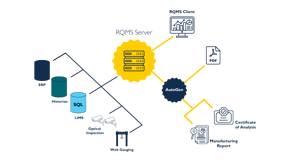
RQMS connects directly to your gauging systems, optical defect cameras, process historians, and LIMS. No new hardware required. It reads data out of the box.

Bridge plant floor to enterprise

RQMS acts as middleware between your real-time production systems and your business systems. Quality data flows automatically into ERP and MES platforms.

Deploy on your network, share data everywhere

RQMS runs inside your production network, and its Web API makes roll quality data available to cloud analytics, AI pipelines, and enterprise dashboards without exposing your plant-floor systems.

Go live without disruption

RQMS layers onto your existing environment; it doesn't replace it. Operators see a familiar interface and quality teams get new visibility without changing their workflow.

You may also be interested in

InfoBatch®

Manufacturing Intelligence. Connect shop floor data to compliance.

InfoLog®

Electronic Logbooks. Logs operator activity and tasks.

AgileDoc SLC®

Lifecycle Documentation. Autogenerates control system documentation.

SignalHub™

Alarm and Event Annotation. Team workflows, audit-ready records.

See what RQMS reveals on your lines.

One flag shouldn't cost you a whole roll. RQMS takes the guesswork out so you can pinpoint exactly where the problem is and cut only what you have to.